
Gold IPTV on Firestick
Setting up Gold IPTV on your Amazon Firestick is quick and simple. You will need to install the Downloader app, use it to download HOT Player, and then contact the Gold IPTV support team through WhatsApp to activate your service.
Our support team will guide you through each step and help you complete the activation.
What You Need Before Starting
Before installing Gold IPTV on your Firestick, make sure you have:
- An Amazon Firestick connected to your television
- A stable internet connection
- Your Firestick remote control
- The Downloader app
- The HOT Player application
- Access to WhatsApp
- An active Gold IPTV subscription
Step 1: Contact Gold IPTV Support on WhatsApp
Contact the Gold IPTV support team through WhatsApp before beginning the installation. A support agent will guide you through the setup and help you activate the service.
WhatsApp support: contact Gold IPTV
For your security, only contact the official WhatsApp number displayed on the Gold IPTV website.
Step 2: Install the Downloader App

The Downloader app allows you to install HOT Player on your Firestick.
Follow these steps:
- Go to the Firestick home screen.
- Select Find.
- Choose Search.
- Type Downloader.
- Select the Downloader app from the search results.
- Choose Download or Get.
- Wait for the installation to finish.
After installing Downloader, return to your Firestick home screen.
Step 3: Allow Downloader to Install HOT Player
Depending on your Firestick version, you may need to allow Downloader to install applications.
- Open Settings on your Firestick.
- Select My Fire TV.
- Open Developer Options.
- Select Install Unknown Apps.
- Find Downloader and turn permission On.
If Developer Options does not appear:
- Open Settings.
- Select My Fire TV.
- Choose About.
- Highlight your Fire TV device name.
- Press the select button on your remote seven times.
- Return to the previous screen and open Developer Options.
Only install applications from a source you trust.
Step 4: Download HOT Player With Code 395800
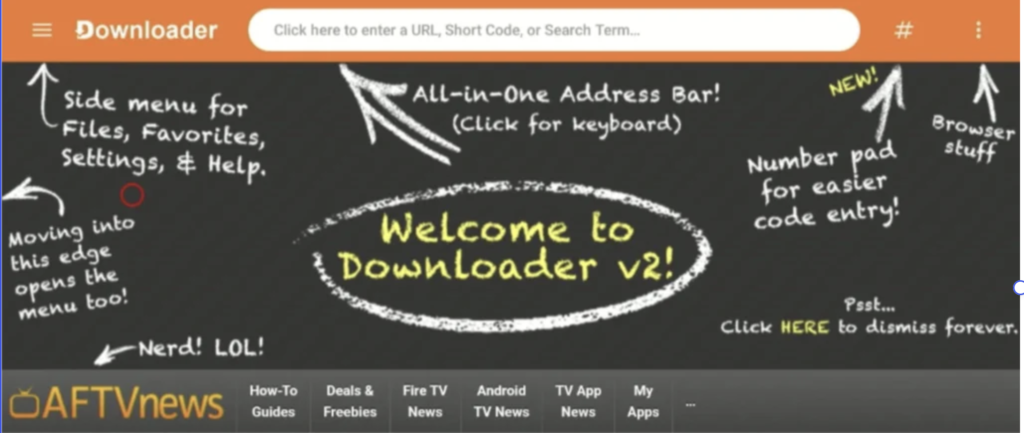
Now you can install HOT Player:
- Open the Downloader app.
- Allow the requested permissions.
- Select the code or URL field.
- Enter the Downloader code:
395800
- Select Go.
- Wait for the HOT Player installation file to download.
- Select Install when prompted.
- Wait for the installation to finish.
- Select Done or Open.
After installation, you may delete the downloaded installation file to free up storage on your Firestick.
Step 5: Open HOT Player

Open HOT Player from your Firestick applications:
- Return to the Firestick home screen.
- Select the applications icon.
- Find HOT Player.
- Open the application.
- Wait for the HOT Player home screen to appear.
The application should display a device identification page containing a MAC address or similar activation information.
Step 6: Send the MAC Address to Gold IPTV Support
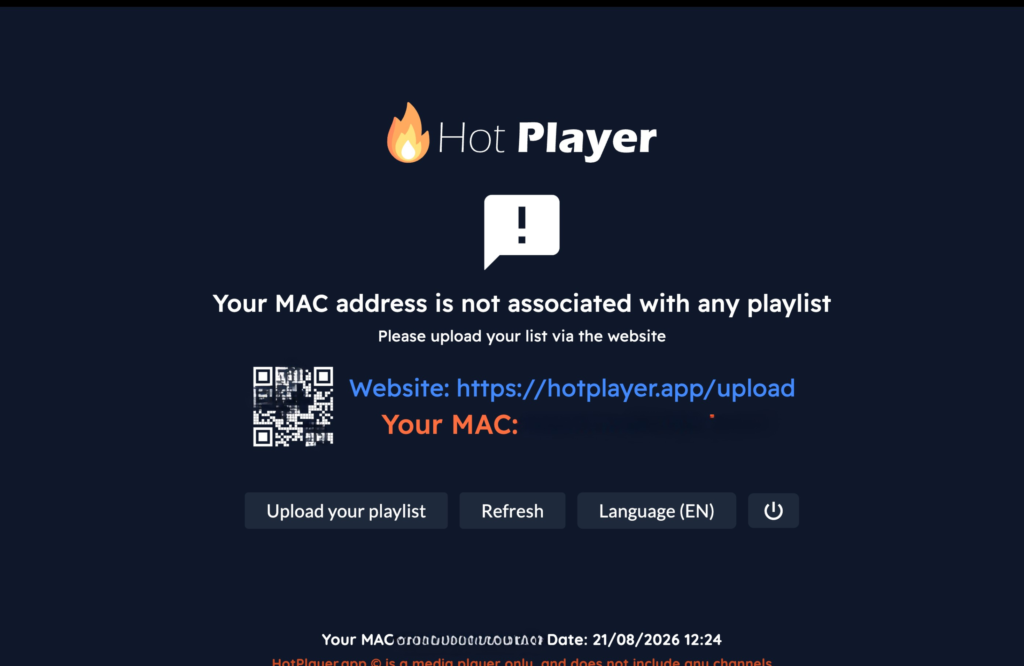
Take a clear picture of the HOT Player home screen showing the MAC address.
Send that picture to the official Gold IPTV support team through WhatsApp. The support agent will use the displayed information to activate Gold IPTV on your HOT Player application.
Make sure:
- The MAC address is completely visible
- The picture is clear and easy to read
- You send it only to the official Gold IPTV WhatsApp number
- You do not publish the MAC address on social media or public websites
Step 7: Wait for Gold IPTV Activation

After sending the picture, wait for the support team to confirm that your Gold IPTV service has been activated.
Once activation is confirmed:
- Close HOT Player completely.
- Open the application again.
- Allow the playlist and categories time to load.
- Select a category and test playback.
You can now start enjoying Gold IPTV on your Firestick.
How to Improve Streaming on Firestick
For a smoother streaming experience:
- Use a stable internet connection
- Keep the Firestick close to your Wi-Fi router
- Use a strong 5 GHz Wi-Fi connection when available
- Restart your router if playback becomes unstable
- Close unused Firestick applications
- Keep enough free storage on the device
- Clear the HOT Player cache when necessary
To clear the cache, go to:
Settings → Applications → Manage Installed Applications → HOT Player → Clear Cache
Do not select Clear Data unless instructed by support, because it may remove saved application information.
Frequently Asked Questions
How do I install Gold IPTV on Firestick?
Install the Downloader app on your Firestick and enter code 395800 to download HOT Player. Open HOT Player, take a picture of the MAC address displayed on its home screen and send it to the official Gold IPTV WhatsApp support team for activation.
What is the Downloader code for HOT Player?
The Downloader code provided for installing HOT Player is 395800. Verify the code with Gold IPTV support if the download page does not show the expected application.
Where can I find the HOT Player MAC address?
Open HOT Player on your Firestick. The MAC address or device identification information should appear on the application’s home or activation screen.
How do I activate Gold IPTV on HOT Player?
Take a clear picture of the HOT Player screen showing the MAC address. Send the picture to the official Gold IPTV support team through WhatsApp and wait for confirmation that your service has been activated.
Is HOT Player included with Gold IPTV?
HOT Player is a separate third-party application used to access the service. Its availability, functionality and any application fees are controlled by its developer, not Gold IPTV.
What should I do if code 395800 does not work?
Check that you entered the code correctly and that your Firestick is connected to the internet. If the problem continues, contact Gold IPTV support on WhatsApp before installing anything else.
How long does activation take?
Activation time can vary. Keep HOT Player installed and wait for the Gold IPTV support team to confirm that the service is ready.
Need Help Setting Up Gold IPTV?
If you need assistance at any stage, contact the official Gold IPTV support team through WhatsApp. Send a clear description of the problem and, when requested, a picture of the HOT Player activation screen.
Contact Gold IPTV Support on WhatsApp
Gold IPTV should only be used to access content that you are legally entitled to view. HOT Player and Downloader are third-party applications, and their availability may vary by device or region.